Website Migration Service
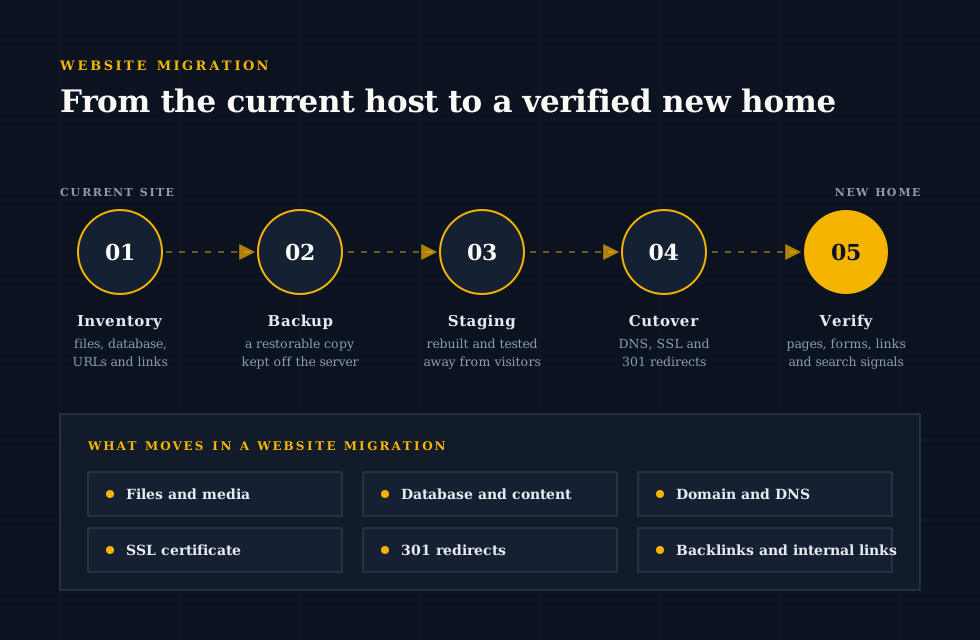
A website migration service takes the whole move off the business owner's desk. Instead of copying files and hoping, each move follows the four stages in the migration trace, with success agreed at the start and public traffic switched only once the new home has proved it works. The website is moved exactly as it stands: nothing is redesigned, updated or altered beyond what the move itself requires, so that if anything behaves differently afterwards, the cause is easy to find.
Server and Web Hosting Migration for a Live Website
A server migration or web hosting migration is the most common kind of move: same domain, same platform, new home. It usually follows:
- a host that has become slow, unreliable or expensive
- a hosting plan the site has outgrown
- a provider closing a product
The work covers:
- copying the files and database
- matching the new server's environment so the site behaves as before (full list in the website migration checklist)
- issuing the SSL certificate on the new server
- moving DNS at a quiet moment
Domain Migration Within a Website Migration Service
A domain migration changes the address itself, perhaps after a rebrand, a merger or a move from a country domain to a .com. Every page on the old domain needs a permanent 301 redirect to its equivalent on the new one, internal links and canonical tags need rewriting, and search engines need to be told about the change. A domain migration is the type of move where careful planning makes the biggest difference to search traffic, because every ranking the old domain has earned has to be handed across, page by page.
Platform Website Migration: WordPress Migration, Shopify Migration and Other CMS Moves
Moving between platforms, for example from Wix or Squarespace to WordPress, from WordPress to Shopify, or from a custom build to a modern CMS, is less a copy and more a careful transfer. Pages, products, blog posts, images and metadata are exported and imported into the new platform's structure, URLs are mapped from the old pattern to the new one, and templates are rebuilt so the content displays correctly. Shopify migration in particular needs attention to product variants, collections, customer records and order history, while WordPress migration often involves preserving plugin data that other platforms store differently.
What a Free Website Migration Usually Covers
Many hosting companies advertise free migration when a customer signs up. It usually covers copying one site's files and database to the new host. Often left out:
- DNS planning and email records
- redirects
- testing of forms and checkouts
- integrations with outside services
- a route back if something goes wrong
A free migration suits a simple site. For a site that takes payments, captures leads or depends on search traffic, it is worth knowing exactly where the free part stops.
SEO and Website Hosting Checks in a Website Migration Service
A professional website migration service treats SEO and website hosting as part of the same job. The new website hosting has to be at least as fast and as reliable as the old, and the site has to answer on the same addresses or redirect from them, so that nothing search engines rely on changes by accident. The SEO items themselves are set out in the website migration SEO checklist template, run on staging before launch and repeated on the live site afterwards.
Website Migration Cost
Website migration cost depends far more on what the website does than on how big it looks. A ten-page brochure site and a ten-page site that takes bookings, sends automated emails and connects to an accounting system are not the same job, even though they appear similar from the outside. The honest way to price a migration is to inventory the site first and quote for the moving parts it actually has.
Average Cost of a Website Migration
Published average costs for website migration vary widely, because the averages mix very different jobs together, and the most involved migrations often cost several times as much as the simplest. An average is useful only once it is clear which kind of job it describes, which is why the type of move and the way it has to be carried out, set out below, are a better guide than any headline figure.
Website Migration Cost by Type: Hosting, Domain, WordPress and CMS Migration
From least to most expensive:
- Hosting migration (a web hosting migration): only the server changes.
- WordPress migration between hosts: adds checks for plugins, scheduled tasks and the database address change.
- Domain migration: adds the redirect and link work described under domain migration above.
- CMS migration to a new platform: content is re-structured rather than copied, and templates are rebuilt.
How the Migration Process Shapes Website Migration Cost
The migration process itself also moves the price:
- a move that can be staged and tested in full on the new host is quicker to verify
- a site that can be frozen for an hour during the final copy is simpler than one that must keep taking orders
- clear access to the old hosting, the domain registrar and the DNS provider saves time; access recovered from a former developer or an expired account adds it
YeevuFix quotes a fixed price once the inventory is complete, so the cost is agreed before the work starts.
Costs a Website Migration Budget Should Include
Beyond the move itself, a realistic website migration budget includes:
- the new hosting plan
- premium plugin or theme licences that need re-activating on the new domain
- an SSL certificate, if the new host does not include one
- time for the business to check its own key journeys after launch
Website Migration Checklist
A website migration checklist is the written plan for the move, and the most underrated tool in it. Written before anything is copied, it lists what exists today, where it lives, who has access to it and how each item will be confirmed on the new home. It turns a migration from a single risky event into a sequence of small, verifiable steps, and it is the document everyone returns to when a question comes up on launch day. The checklist below is the order the work follows, from planning to the final sign-off.
Migration Planning: The First Part of a Website Migration Checklist
Every website migration job is run as a project, and it starts with questions rather than copying: what is moving, why, and what must not break. The answers set the scope of the migration project, such as a hosting migration only, a CMS migration with content migration, or a site migration with a domain migration attached, and decide what access is needed. Migration planning then turns that scope into a migration strategy: when the switch will happen, who needs to be available, how success will be measured, and the order of the stages:
- Hosting migration: prepares and tests the new server.
- CMS migration: moves the site onto its new platform and rebuilds what needs rebuilding.
- Content migration: moves pages, posts, products and media with their metadata intact.
- Domain migration: if there is one, comes last.
Changing more than one thing at a time multiplies the risk, so each stage is a separate step with its own checks. Whatever is being moved, a new migration follows the same migration checklist, which keeps the migration process predictable.
Domain, Server and Data Migration Items on the Website Migration Checklist
- Record the domain and DNS setup.Note the registrar, the nameservers and every DNS record, including the ones for email, verification and other services, so nothing is dropped when DNS moves.
- Lower the DNS time-to-live in advance.Reducing the TTL a day or two before the switch means the change reaches visitors faster on the day.
- Take two backups.For safety, two separate backups are taken before anything changes. The first is a raw backup: the database exported directly and the files copied from the server as they are, with no software in between. The second is made with a dedicated backup tool, which packages the whole site into a copy that can be restored in one step. Both are stored away from the old and new servers, so if one backup turns out to be incomplete, the other is still there to return to.
- Prepare the new server.Match the PHP and database versions, memory limits, scheduled tasks and any server settings the site depends on.
- Carry out the data migration.Copy files and database to the new home and update any stored addresses, paths and credentials.
- Test on staging.Check every important page, form, login, payment and integration on the new copy before the public sees it.
Website Migration SEO Checklist Template
Site migration SEO deserves its own short checklist, because search problems often appear days after a move rather than on launch day. The template:
- a crawl of the old site, saved before the move
- the pages that bring in the most visitors
- titles, descriptions, headings and canonical tags confirmed on the new site
- the robots file checked so search engines are not blocked
- the sitemap updated and resubmitted
- a crawl of the new site compared against the old one
301 Redirects and the Website Migration Process
Any address that changes in the migration process needs a permanent 301 redirect from the old URL to the most relevant new one, not to the homepage. Redirects are tested one by one before launch, including old addresses that other websites link to, and checked again afterwards for chains (one redirect leading to another) and loops.
Cutover and Sign-Off on the Website Migration Checklist
On launch day, each step is ticked off as it is confirmed, not as it is attempted:
- Final copy of any content that changed.
- DNS switched.
- SSL certificate confirmed on the live address.
- Site checked from the outside as a visitor sees it: pages, forms, checkout, email notifications and redirects.
If anything behaves differently from staging, the step is paused and fixed, or the switch is reversed. The old hosting stays in place until everyone is satisfied, so there is always a route back.
The website migration job ends with evidence, not just a message that the site is live. The handover includes:
- the 301 redirect report and the redirect map
- the before-and-after crawl comparison
- end-to-end tests of key forms and payments
- both backups
These are written up in a launch record, so the business has a clear account of what moved and how it was checked.
Website Migration Tools
No single tool moves a whole website. A website migration is carried out with a small kit of tools, each responsible for one part of the job: one copies the data, one records every address the site answers on, one checks that search engines will find the same pages afterwards, and a written website migration checklist keeps the plan honest. Knowing which tool covers which part matters more than the brand name on any of them, because most failed migrations are not caused by a bad tool but by a part of the website that no tool was looking at.
Data Migration Tools in a Website Migration
Data migration is the heart of the move: the site's files (themes, plugins, images, uploads and configuration) and the database holding its pages, products, orders, users and settings. The usual tools are the hosting control panel's backup and file tools, a direct database export and a secure file transfer connection. The right approach depends on size:
- Small sites: a packaged backup and restore is usually fastest.
- Large sites (many gigabytes of images or years of orders): archive tools time out or hit upload limits, so files and database are moved separately and checked against each other.
- Server-to-server copying beats downloading to a laptop and re-uploading: nothing is squeezed through a home connection or left half-copied when a transfer drops.
WordPress Migration Plugins for a WordPress Site Migration
For WordPress, a migration plugin can package the files and database into one archive and unpack it on the destination, rewriting the old address as it goes. For a small site moving between two well-behaved hosts, that is often enough. A plugin works inside WordPress, so it cannot see:
- DNS records and email routing
- server-level redirects and scheduled tasks set up on the server
- files stored outside the WordPress folders
- whether the contact form works, or whether the new server runs the PHP version the theme was built for
Large archives can also exceed the destination host's upload limits. Plugins move the WordPress part of a website migration; they do not replace planning the rest.
SEO Migration Tools Used Before and After a Website Migration
Search engines rank addresses, not websites in the abstract. SEO migration relies on three kinds of tool:
- a crawler that records every URL with its title, status code and canonical tag
- search console data showing which pages earn traffic and links
- a redirect checker that follows each old address to its final destination
Together they show the new site works for search engines the way the old one did. How they are used before and after the move is set out in the website migration SEO checklist template.
Web Hosting Tools on the Destination Server
The destination web hosting account brings its own tools: a staging area where the copied site can run without the public seeing it, a way to preview the site before DNS changes, SSL certificate issuing, and access to error logs. A host with proper staging allows the site to be tested in full before launch; a host without it means the testing has to be arranged by other means, such as previewing the site through a temporary address.
Matching Website Migration Tools to the Migration Strategy
The migration strategy decides the toolset, not the other way round:
- Host-to-host move: data migration and DNS tools.
- Domain migration: crawling and redirect tools above all.
- Platform migration: export and import tools and a careful URL map.
The size of the site and the search traffic and revenue at stake decide how far beyond that basic set it goes. Starting from the strategy keeps the toolset small and gives every risk a tool watching it.
Website Migration link
Links are where much of a website's search value lives, and they are the part of a website migration most often overlooked. Backlinks from other websites point to specific old addresses; internal links connect pages to each other; and search engines use both to decide which pages matter. A migration that keeps the content but breaks the links can lose rankings that took years to earn.
How a Website Migration Affects Backlinks and Rankings
Every backlink points at an exact URL. If that URL stops working after the move, the link sends visitors to an error page and passes no value to the site. Rankings often fall in step. A 301 redirect from each old address to its new equivalent tells search engines that the page has moved permanently, so the authority built up by those links can follow it. Pages with the most backlinks are checked first, because they carry the most weight.
Internal Links and Content Migration in a Website Migration
Content migration moves the words and images, but internal links are written into that content and often still point at the old addresses. Left alone, every internal click passes through a redirect, which slows the site down and dilutes the signals search engines read. During the move, internal links in menus, footers, page content and sitemaps are rewritten to point directly at the new URLs.
Keeping Backlinks Working Through a Domain Migration
A domain migration changes every address at once, so it puts every backlink at risk. The old domain is kept registered and redirecting for the long term, ideally for years rather than months, because links from other sites will keep pointing at it. Where a few high-value sites link to the business, it is often worth asking them to update the link to the new domain directly.
SEO Recovery After a Website Migration Loses Links
When a migration has already gone wrong and traffic has dropped, SEO recovery starts by finding what changed. The pages that used to earn traffic and backlinks are compared with what those addresses return today, missing or incorrect redirects are rebuilt, internal links are corrected, and search engines are asked to recrawl the affected pages. Recovery is often possible, but it takes longer than getting the migration right the first time, and the results depend on how long the broken links were live.